Save Tab URLs and Link Shortcuts

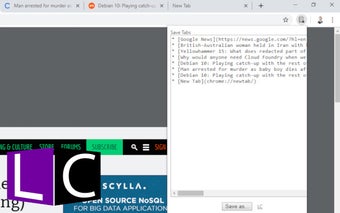
It is used to save all URLs and open it in a new tab when needed. Also provides ability to generate and list all the opened tabs. With the help of the saved tab URLs and link shortcuts, you will be able to return quickly to the tab you were in.

It features include:

  • Create bookmarking list of any opened tab
  • Create bookmarking link from any URL or webpage
  • Generate list of all opened tabs
  • Add to Favorites, Bookmarks and History list
  • Generate URL based on current URL
  • Provide easy-access to URL history

It is very simple and quick to install.

For more detailed documentation and installation instructions please visit the Save Tab URLs page.

 0/1

App specs

  • License

    Free

  • Version

    0.1.5

  • Latest update

  • Platform

    chrome

  • Language

    English

  • Developer

Program available in other languages


User reviews about Save Tab URLs

Have you tried Save Tab URLs? Be the first to leave your opinion!

Add review

Top extensions for Google Chrome

Top downloads Add-ons & Tools for Google Chrome

Top downloads Add-ons & Tools for Google Chrome

Top downloads Add-ons & Tools for Google Chrome

Related topics about Save Tab URLs

You may also like

Explore Apps

Latest articles

Laws concerning the use of this software vary from country to country. We do not encourage or condone the use of this program if it is in violation of these laws.
Softonic

Is Save Tab URLs safe?

Score result: Clean

This file passed a comprehensive security scan using VirusTotal technology. It is safe to download.

  • Virus free
  • Spyware free
  • Malware free
  • Verified by Security Partners

    VirusTotal logo

Scan Info

Last scan
Tuesday, April 30, 2024
Scan provider
VirusTotal

Softonic security commitment

Save Tab URLs has been thoroughly scanned by our advanced security systems and verified by industry-leading partners. This file comes from the official developer and has passed all our security checks, showing no signs of viruses, malware, or spyware. For more information, visit our Security and Trust Center